
What DMX and control features should buyers seek in LED beam lights?
- Question 1 — Which DMX channel mode should I choose so fixtures behave predictably across different consoles and rigs?
- Question 2 — How does RDM and remote firmware update capability reduce rig downtime and what exact RDM data should I require?
- Question 3 — When should buyers insist on 16‑bit pan/tilt and 16‑bit color/dimmer channels in a moving head beam?
- Question 4 — Is wireless DMX (CRMX/W‑DMX) reliable enough to use as the primary control for outdoor beam shows, and what redundancy features should I require?
- Question 5 — Which DMX and control features help prevent overheating and extend LED engine life in a beam fixture?
- Question 6 — How do Art‑Net, sACN and networkable features (fixture tracking, remote patching) improve control for multi‑universe LED beam rigs?
- Concluding summary: Advantages of choosing LED beam lights with the recommended DMX and control features
What DMX and Control Features Should Buyers Seek in LED Beam Lights? 6 Deep Questions Answered
Question 1 — Which DMX channel mode should I choose so fixtures behave predictably across different consoles and rigs?
Answer:
Pick fixtures that provide clearly documented, multi‑mode DMX personalities (usually labelled Basic/Standard and Advanced/Full) and select the simplest mode that still exposes the controls you need. Practical guidance:
- Choose a universal basic mode (8–16 channels) when you need predictable pan/tilt, dimmer, strobe and color macros that map to almost every console. This reduces mismatches when swapping fixtures between desks.
- Use an advanced mode (24–56+ channels) only if you need high‑resolution features (16‑bit pan/tilt, separate fine/coarse for zoom/iris, full CMY/RGBW control, gobo indexing, prism rotation, pixel mapping). Advanced modes are powerful but increase risk of mapping errors if fixture files are missing.
- Always ask the manufacturer for downloadable fixture files for major consoles (grandMA2/3 .fbx/.xml, Hog 4 .fdr, Avolites, ETC). If a fixture lacks official files, consider it higher risk.
- Validate that the fixture supports a consistent channel ordering (coarse then fine) and that pan/tilt offer both 8‑bit and 16‑bit channels. 16‑bit (two channels per axis) is required for smooth, jitter‑free gobo framing and large projection accuracy.
Why this matters: inconsistent channel modes are the top cause of unexpected behavior during load‑in. If the fixture offers clear, documented personalities plus manufacturer fixture files, integration is much faster and safer.
—
Question 2 — How does RDM and remote firmware update capability reduce rig downtime and what exact RDM data should I require?
Answer:
RDM (Remote Device Management, ANSI E1.20) is a game changer for touring and fixed installs. It lets you remotely query and configure fixtures over DMX wiring without physical access. Key RDM features to demand:
- Remote patching and address assignment: set DMX addresses and modes from a central console or RDM controller, saving hours at load‑in.
- Status telemetry: query lamp/LED hours, temperature, fan status, input voltage and error flags. These data points let you schedule preventive maintenance rather than react to failures.
- Firmware update support: fixtures that support firmware downloads via Ethernet (Art‑Net/sACN or manufacturer tool), USB or RDM reduce the need to ship units back for updates. Look for manufacturers that publish firmware and have an upgrade tool.
- RDM event notifications: over‑temperature or lamp failure alerts that can trigger console macros or email alerts in a networked management system.
Operational tip: confirm the fixture implements a robust RDM footprint (shows sensible PIDs for temperature, lamp hours, fan RPM) and test RDM with your console or an RDM tool during evaluation. If RDM telemetry shows only present/not present, the value is limited.
—
Question 3 — When should buyers insist on 16‑bit pan/tilt and 16‑bit color/dimmer channels in a moving head beam?
Answer:
Demand 16‑bit resolution when your shows require smooth movement, accurate framing and banding‑free color fades.
- Pan/Tilt: 16‑bit (fine + coarse channels) gives sub‑degree resolution and removes visible stepping on slow sweeps or when hitting small gobo positions. If you program tight beam framing, 16‑bit is essential.
- Dimmer & Color: 16‑bit dimmer avoids visible stepping in slow fades—important on camera. For CMY or RGBW mixing, 16‑bit per color channel gives smooth gradients and prevents posterization during long color sweeps.
- When to accept 8‑bit: small clubs or simple shows that only use on/off moves and basic color presets can get by with 8‑bit to save channel count.
Specification check: confirm the fixture lists 16‑bit as separate fine/coarse channels in its data sheet and demonstrate smooth motion in a test run. Instruments that advertise high resolution but lack explicit 16‑bit channels are suspect.
—
Question 4 — Is wireless DMX (CRMX/W‑DMX) reliable enough to use as the primary control for outdoor beam shows, and what redundancy features should I require?
Answer:
Wireless DMX (LumenRadio CRMX, Wireless Solution W‑DMX) is mature and widely used for indoor and outdoor events, but reliability depends on product choice and deployment. Here are the safeguards to require:
- Use fixtures with both wireless DMX receiver modules (CRMX or W‑DMX) and wired DMX (5‑pin XLR) as fallback. Never rely solely on wireless without a wired fallback for critical shows.
- Require support for multiple antenna options and external antenna ports so you can mount receivers for optimal line‑of‑sight.
- Look for wireless that supports frequency‑hopping and interference mitigation (LumenRadio CRMX uses FHSS and adaptive streaming) and check manufacturer notes for roaming behavior when multiple transmitters are used.
- Design redundancy: dual‑transmitter setups, wired backup trunks, and the ability to automatically failover to wired DMX or Art‑Net/sACN. Many integrators run a parallel wired universe for critical channels (master dimmer, blackout, safety cues).
- Environmental checks: 2.4 GHz bands are congested at festivals. For critical outdoor shows consider spectrum scans and use directionality and height to avoid interference.
Practical rule: wireless DMX is fine for motorized truss, small clusters and where cabling is impractical, but for main stage trunks that carry grandMA master or critical cues, wired DMX or Ether‑based control (Art‑Net/sACN) with wireless for secondary runs is recommended.
—
Question 5 — Which DMX and control features help prevent overheating and extend LED engine life in a beam fixture?
Answer:
LED longevity is strongly influenced by thermal management and how the fixture reports and reacts to thermal events. Require these features:
- Thermal sensors + RDM reporting: fixtures that expose internal temperature (LED board, power supply) via RDM let you monitor aging and spot failing cooling systems before catastrophic failure.
- Programmable fan curves: fan control that responds to temperature and supports quiet/fanless modes prevents overheating while minimizing noise in broadcast or theatre environments.
- Intelligent dimmer limiting: a DMX‑controllable thermal derating mode that reduces LED output under sustained high ambient temps to protect chips.
- Power inrush limiting and active power factor correction (PFC): reduces electrical stress and can prevent nuisance breaker trips on large rigs.
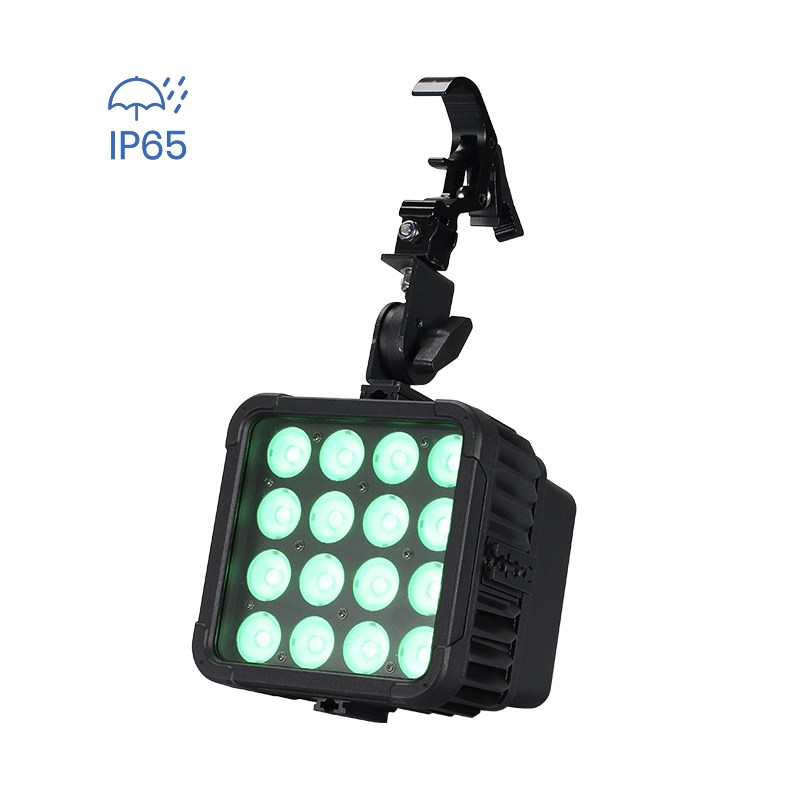
- IP rating where needed: for outdoor beam fixtures demand IP65 or better for sealed optical and LED modules so moisture doesn’t accelerate degradation.
Actionable check: during vendor evaluation, ask for thermal imaging or specifications (TJ max of LED, case temps under full output at 25°C ambient) and ensure the fixture publishes cooling behavior and service intervals.
—
Question 6 — How do Art‑Net, sACN and networkable features (fixture tracking, remote patching) improve control for multi‑universe LED beam rigs?
Answer:
For multi‑universe shows, networked control is essential. Art‑Net (proprietary protocol) and sACN (ANSI E1.31) are the standard transport layers for streaming DMX over Ethernet. Features to require:
- Native Art‑Net and sACN support: allows the fixture or an attached node to receive DMX over Ethernet, greatly simplifying long runs and multi‑universe setups.
- EtherCon and Neutrik connectors: professional, lockable network and power connectors improve reliability on tour.
- DHCP + static IP and easy network diagnostics: fixtures that support both auto IP (DHCP) and static addressing and expose IP/Universe status via a web UI or RDM save time.
- Fixture tracking and patch via RDM/console: remote patching and naming (assign friendly names, groups and tracking) help operators manage thousands of channels.
- Multicast vs Unicast control: fixtures capable of sACN multicast reduce CPU/network load when many fixtures subscribe to the same universes; unicast can simplify network debugging.
- Patching convenience: require downloadable fixture personality files and the ability to map channels quickly on consoles and architectural controllers.
Real‑world payoff: using Art‑Net/sACN turns an unruly spaghetti of 5‑pin runs into a structured network where you can route universes, monitor health, and perform remote patching across racks and venues.
—
Concluding summary: Advantages of choosing LED beam lights with the recommended DMX and control features
Contact us for a quote: www.litelees.com | litelees@litelees.com
Choosing LED beam light fixtures with documented multi‑mode DMX personalities, 16‑bit motion/color channels, RDM telemetry and firmware support, and both wired (DMX/Art‑Net/sACN) and certified wireless (CRMX/W‑DMX) options significantly reduces integration time, prevents on‑site surprises and prolongs LED engine life. These features deliver smoother motion, camera‑friendly fades, faster load‑ins, remote diagnostics and safer outdoor operation (with suitable IP ratings). For touring and fixed installs where show continuity matters, insist on clear fixture files for major consoles, RDM status reporting, EtherCon network ports and redundant control paths.
If you’re planning a rig or upgrade and want help choosing fixtures or getting a custom quote for moving head beam, pixel‑mapped beam and narrow angle LED beam light units, contact our technical sales at www.litelees.com or litelees@litelees.com.
Standards referenced: DMX512 (ANSI E1.11), RDM (ANSI E1.20), sACN (ANSI E1.31). For wireless DMX, LumenRadio CRMX and Wireless Solution W‑DMX are widely supported vendor technologies.

Products
How long is the warranty period for your products?
We offer a standard 1-year warranty on all products, with extended warranty options available upon request. During the warranty period, we provide free technical support and parts replacement for non-human damage.
What is the lifespan of your LED stage lights?
Our LED lights use high-quality chips with a rated lifespan of over 50,000 hours. Proper usage and maintenance ensure long-term reliability and stable performance, making them a smart investment for any venue.
Company
Can LiteLEES handle OEM/ODM orders?
Absolutely. With our strong R&D capabilities and advanced manufacturing, we can customize designs, features, and branding to meet your specific needs.
Where is LiteLEES located?
Our headquarters and manufacturing facility are located in Guangzhou, China, with products exported to over 70 countries worldwide.
What certifications do your products have?
All LiteLEES products are certified by CE, RoHS, FCC, and BIS. Our factory is ISO9001 quality management system certified.
Magic Cube V6 IP

Stormy Shake Blinder IP
Want to get more up-to-date news?
If you have any comments or good suggestions, please leave us a message; later our professional staff will contact you as soon as possible.

We are professional stage lighting manufacturers offering OEM and ODM LED stage lights.
Contact
Email us
Call us
Address
No.6 Longnan Road, Huashan Town, Huadu District Guangzhou, Guangdong Province, China.
LiteLEES Professional
Less Lighting